
 How to Change Your Domain DNS Records
When you park your domain names with UK-Cheapest.co.uk, we give you full control over the management of your domain DNS records. We know this can be a complicated subject. So we make it as easy as possible for you.
You have full control over all DNS record types such as A, CNAME, MX and TXT. We also have custom DNS templates that make it easy to connect to services such as Moonfruit or Google Apps Gmail.
You have full control over Parked Domain DNS
The DNS Manager is used to edit DNS records stored on our domain parking server. To use Domain Parking Features, you need to ensure your domain name is parked.
If you are not sure it is easy to Check if your Domain Name is parked.
Locating the DNS Manager for your domain
To find the DNS manager, simply follow these steps:
- Login to your Client Area and go to Domains > My Domains
- Click Manage on the desired domain name
- Click Parking Tools > DNS Manager
- Add and Delete DNS records as required
The DNS Manager is So EASY to Use
You can freely add or delete all A, MX, TXT (SPF) and CNAME records for your domain. The records are added in realtime, there is no delay to your record changes being submitted to the server.
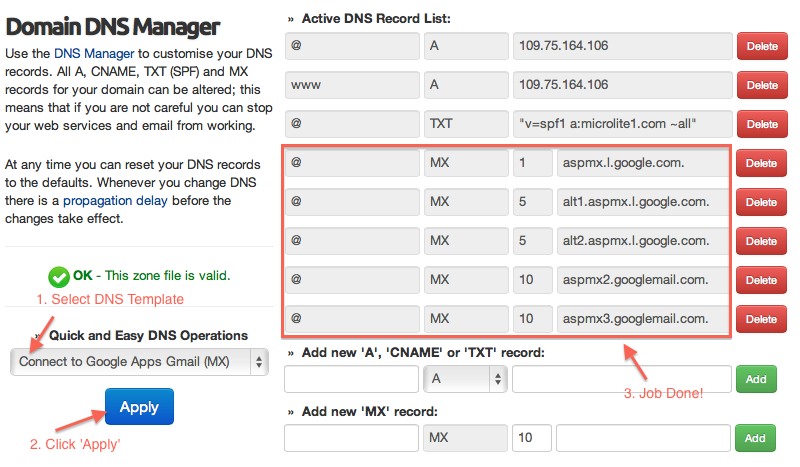
However, let us show you how easy it is to use our DNS templates. 3 clicks configures your domain for Google Apps Gmail. All MX records added, non required records removed, DNS zone file reloaded.
If you get lost, it’s easy to start from scratch
Managing DNS can be a complex business. If you are new to DNS management, you may be trying a little ‘trial and error’. That’s ok. But, if your DNS Zone becomes “invalid” then you can reset it to defaults.
- Navigate to the Domain DNS Manager
- Find the DNS Operations list box
- Select Reset to Original Defaults
- Press Apply
Your DNS is now set as per the original defaults for a new domain. Any DNS record changes can take up to 24 hours to fully propagate across the global internet so do not expect instant results in your web browser.
Advanced DNS Management – For FREE
Our Advanced DNS Manager is provided FREE with all domain names registered or transferred to us. Full control, at no extra cost, where you need it most. There are no limits to the changes you can make.