Domain Privacy: Protecting your ID

DomainNameRegistration
Your Privacy is Protected with UK Cheapest

When you register a domain name, certain personal information is required such as your name, address, email, and phone number. But don’t worry – your privacy is our priority.

UK Domains (.co.uk, .uk, etc.)

For Nominet domains (like .co.uk and .uk), if you’re registering as an individual, your details will be automatically hidden from the public WHOIS database. Thanks to UK data protection regulations (including GDPR), your name, address, phone number, and email will not be visible publicly. These details are only available in response to legitimate legal or regulatory requests.

ICANN Domains (.com, .net, etc.)

For ICANN-managed domains like .com and .net, basic privacy is applied by default. This means your name, street address, city, postcode, phone, and email are hidden.

However, ICANN still requires that some limited, non-personal information remains public:

  • Organisation name (if provided)
  • State/Province
  • Country Code (e.g. GB)

If you’d prefer to keep even this information private, we offer an Enhanced ID Protection upgrade, which hides everything, including your Organisation, State, and Country Code.

Summary

  • UK domains (individuals): Full privacy by default – nothing is shown publicly.
  • ICANN domains: Partial privacy included – full privacy available with upgrade.
  • Enhanced ID Protection: Optional upgrade to fully anonymise ICANN domain records.

How do I purchase Enhanced ID Protection?

When registering your domain name you will be offered the Domain Privacy service automatically. At this point your can either accept or decline the Domain Privacy offer.

For existing ICANN domains, you can add ID Protection as follows:

  • Login to Client Area
  • Domains > My Domains
  • Locate your domain and hit Manage Domain
  • Click the “Addons” tab
  • Add “ID Protection”

Parked Domains: Using the Homepage Builder

DomainNameRegistrationBuild a 3 Page Mini Site with Homepage Builder

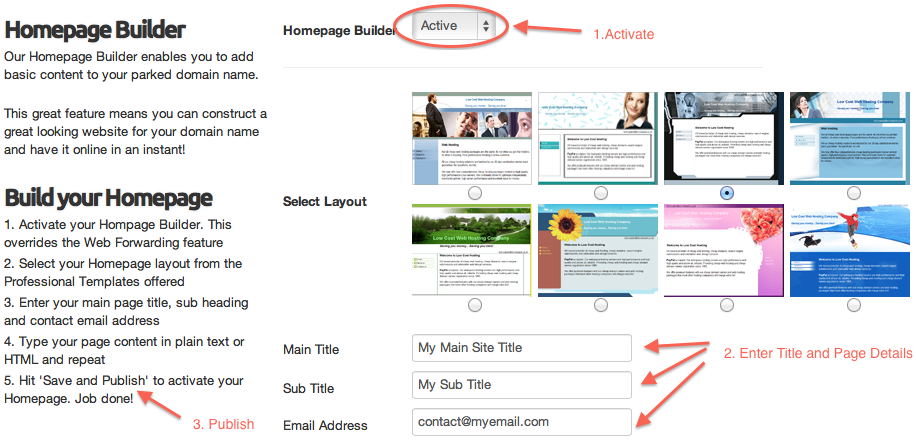
Build a 3 page website using our Domain Homepage Builder, you can do this the instant your domain name is registered or transferred to us. Homepage builder comes free with all domain names, no hosting service is required.

Your homepage can contain up to three web pages, simply choose your desired homepage style from our selection of design layouts and then enter your web site content and contact details for each of your web pages. Hit “Publish”. Your web site is online. Yes, that’s all there is to it.

This is a the perfect solution to getting a mini three page website online quicker than you can imagine! And as with all of our services, there are no additional, hidden or ongoing fees.

Using Homepage Builder is a Point and Click Operation

We’ve made the Homepage Builder very easy to use. Simply select your desired layout, enter your page details, enter your desired page text or HTML and hit the ‘Save and Publish’ button. Your site is online in an instant. Perfect to get a basic web presence going straight away with no expense.

homepagebuilder

How to find Homepage builder

Your domain needs to be parked – not hosted, in order to use Homepage builder. To use the Parking Features, you need to ensure your domain name is parked. By default, all domain names are parked unless you have changed the nameservers from their defaults. If you are not sure it is easy to Check if your Domain Name is parked.

To use Homepage Builder, simply follow these steps:

  1. Login to your Client Area and go to Domains > My Domains
  2. Click Manage on the desired domain name
  3. Click Parking Tools > Homepage Builder
  4. Select your desired layout
  5. Enter the content you require
  6. Hit Publish to make your Homepage live

Are the Homepage Mini Sites search engine friendly?

Very! In fact they are designed to be SEO friendly. You can customise the meta tags entirely to your requirements. The mini sites integrate seamlessly with Google Webmasters and Google Analytics for detailed backlink and traffic monitoring.

Emergency Hardware Replacement – MICROLITE26.COM

Scheduled for weekend 19/20/21 June 2015

We have been unable to satisfactorily bring MICROLITE26 up to the level of reliability that we require as a minimum due to an inherent hardware fault that we have not been able to successfully isolate.

With this in mind, we have decided to replace all of the hardware completely – including the storage units.

During the weekend 19/20/21 June, we will be migrating all client data from the current hardware (5.77.60.174) to completely new hardware (5.77.60.165).

There will be no downtime for your web sites or email services. We will switch the new server into production only after it has passed our comprehensive data migration and validation testing.

Notice: Please refrain from making significant changes to your web site during this period. The migration of the data will take many hours. We request that you put off any changes until the upgrade is complete to avoid an inconsistent transfer of your site data.

Thank you for your patience,

Colin @ Level III Team

Parked Domains: Setting up Email Forwarding

DomainNameRegistrationHow to configure Email Forwarding for Parked Domain Names

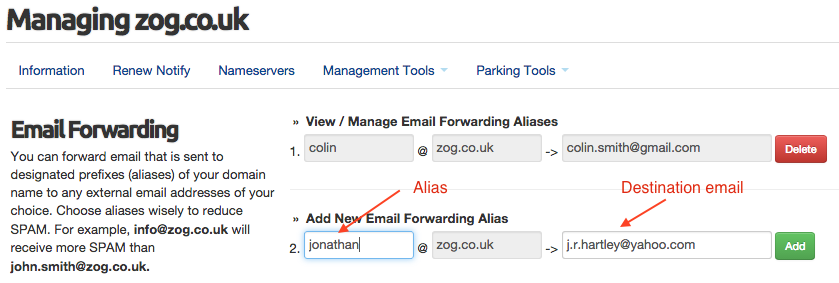
When you park your domain names with UK-Cheapest.co.uk, you receive email forwarding facilities that enable you to create email aliases which can be set to forward to any email address of your choice.

Email aliases are like email addresses but they do not store emails received, they simply forward them on to the destination that you set when you create them. There is no limit to the number of email forwarding aliases that you can create with your parked domain.

Use Email Forwarding Aliases to Minimise SPAM

The beauty of using Email forwarding aliases is that you can reject all email sent to your domain name except that sent to specific aliases, this can drastically reduce the levels of SPAM received to your domain name.

You can add, remove and edit your email aliases at any time. Any changes that you submit are activated within minutes and you can create as many as you like.

Setting up Email Forwarding is Easy

To use Domain Parking Features, you need to ensure your domain name is parked. If you are not sure it is easy to Check if your Domain Name is parked.

emailforwarding

To configure Email Forwarding, simply follow these steps:

  1. Login to your Client Area and go to Domains > My Domains
  2. Click Manage on the desired domain name
  3. Click Parking Tools > Email Forwarding
  4. Enter your desired email alias in the first testbox
  5. Enter your target email address in the second textbox
  6. Press the Add button

As long as your domain name is parked, the forwarding feature will work within an hour.

Advanced Email Forwarding – For FREE

Our Advanced Email Forwarding is provided FREE with all domain names registered or transferred to us. Full control, at no extra cost, where you need it most. There are no limits to the changes you can make.


Best Place to Buy a Domain Name


Parked Domains: Setting up Web Forwarding

DomainNameRegistrationHow to configure Web Forwarding for Parked Domain Names

When you park your domain names with UK-Cheapest.co.uk, you receive web forwarding facilities that enable you to forward your domain name to another URL.

301 Permanent: The recommended search engine friendly redirect to use. This redirect method is Google and SEO friendly. For SEO purposes, “link juice” is passed to the target URL when a 301 redirect is performed. This is not the case with a 302 or Masked redirect.

302 Temporary: Use when you want to temporarily redirect to another URL however you do not want to pass “link juice” to the target. This type of forwarding is rarely necessary, it is not search engine friendly.

Masked/Framed: This method attempts to keep your domain name in the browser address bar whilst displaying the target site in a frame. The advantage of using a frame is that you have control over the meta tag settings. Some target sites do not allow masked forwarding and will show the destination URL in the browser address bar.

Setting up Web Forwarding is easy

To use the Parking Features, you need to ensure your domain name is parked. If you are not sure it is easy to Check if your Domain Name is parked.

webforwarding

To configure Web Forwarding, simply follow these steps:

  1. Login to your Client Area and go to Domains > My Domains
  2. Click Manage on the desired domain name
  3. Click Parking Tools > Web Forwarding
  4. Select the desired method from Forwarding Type listbox
  5. Enter your target URL in the textbox
  6. Press the Update Web Forwarding button

As long as your domain name is parked, the forwarding feature will work immediately. In some cases you may need to restart your browser if you find you are still forwarded to the previous destination URL.

Advanced Web Forwarding – For FREE

Our Advanced Web Forwarding is provided FREE with all domain names registered or transferred to us. Full control, at no extra cost, where you need it most. There are no limits to the changes you can make.


Domains .co.uk £4.95 .com £7.95