UK Cheapest – The Smart Choice for Domain Registration

10 Reasons Why People Choose UK Cheapest

With so many domain registrars to choose from it is difficult to determine which deals are the best. If you have done your homework you will have already discovered that the initial registration cost is not the only cost you need to consider. We make calculating hidden fees easy – by not having any!

  • NO Transfer Out Fees – Our Transfer Away fees are £0.00, that’s right, we do not hold you to ransom if you register your domain with us.
  • NO WHOIS Record Fees – It is important to keep your WHOIS details up to date. We do not charge for any changes to your WHOIS record.
  • NO IPSTAG Change Fees – No fee to transfer your UK domain or for IPSTAG changes. Many registrars make this fee so high that you are stuck with them.
  • NO Registrar Lock Fees – It is important to lock your non-UK domain but we don’t extort you for it. We give you FREE control over your Domain Locking.
  • NO Transfer Code Fees – Registrars often quote free transfer outs and then charge you for the AUTH code! Get your auth code from us at ANY time for FREE.
  • NO Parked Domain Ads – To many registrars place ads on your parked domains. WE do not place ANY advertisements on YOUR parked domain names.
  • NO Web Forwarding Fees – Forward your domain to any location and change this setting whenever your wish. For free. No charges. Ever.
  • NO Name Server Change Fees – Change your name servers as you wish. You can change your name servers as often as you want at absolutely no cost. Ever.
  • NO DNS Management Fees – This is often an additional fee based service to your domain registration. With us, you have FULL control over your domain DNS Management at all times.
  • No Email Forwarding Fees – Create an unlimited number of email forwarders (or aliases) for every single one of your domain names. Absolutely no charge. Ever.

Avoid nasty surprises. BEFORE you use another provider, find out their hidden fees.

newgtld2

Great New Top Level Domains available for Registration

The Domain Name Landscape has changed recently.

For years, we had little choice of gTLDs (Global Top Level Domains) and we kinda got used to the idea that it was all about .co.uk, .com, .net.

But times have changed.

There are now new gTLDs for all business categories and organisation types.

If your business is accountancy, no longer do you fight to register “MyFirm.com”, you can register the more appropriate “MyFirm.accountants”. How good does that look?

But, you need to hurry. These new tLDS are catching on, and as with the original domain name extensions, soon all the great names will be gone.

Extensions we have added and that are available for registration right now include:

  • .accountants
  • .agency
  • .business
  • .associates
  • .catering
  • .cleaning
  • register-a-domain-name.consulting
  • .design
  • .enterprises
  • .estate
  • .events
  • .gifts
  • .guide
  • .life
  • .limited
  • .media
  • .network
  • .photos
  • .photography
  • .plumbing
  • .properties
  • .pub
  • .restaurant
  • .solutions
  • .town
  • .vet

Register and reserve your business relevant names now – before someone else does!

red_ordernow

How to Change your Domain Name Servers

Changing your Domain Name Servers

When you register a new domain name, often one of the first things you want to do is to connect it to your web hosting service. Usually your web host will provide name servers.

Until you change the name servers on your domain name, your domain will be parked and you will be able to use any of the parking features which come with every domain name.

Locating the Nameserver tab for your domain

Changing your domain nameservers is easy. You can change them as often as you need.

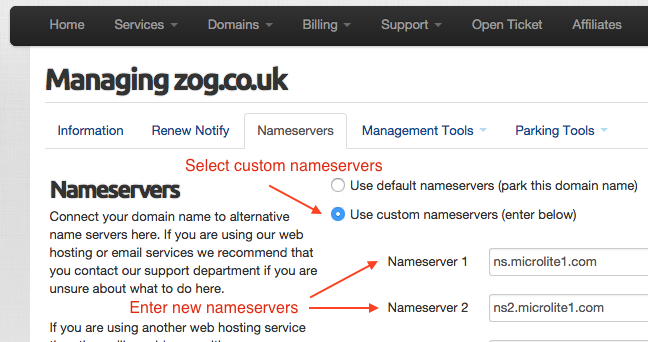
changenameservers

To change your domain nameservers, simply follow these steps:

  1. Login to your Client Area and go to Domains > My Domains
  2. Click Manage on the desired domain name
  3. Click Nameservers tab
  4. Select Use Custom Nameservers
  5. Enter at least two different name servers
  6. Press Change Nameservers button

Any nameserver changes can take up to 24 hours to fully propagate across the global internet so do not expect instant results in your web browser.

Video Demostration

Data validation for UK domains

uk-nominetAs of 6th May Nominet have updated their data validation processes.

Nominet will attempt to validate all registrant name and address data through their third party sources at the point of registration or when the WHOIS contact details are updated.

How does Nominet validate my details?

Nominet will check the registrant name agaist the Electoral Roll and Company’s House . The domain must be registered to an individual person or a registered LTD or PLC company.

Nominet will check the registrant address against the Royal Mail Postcode file, international addresses will be checked against similar sources where they exist.

What happens if my details cannot be validated?

If Nominet are unable to validate the registrant name or address they will contact you on the email address that the domain is registered to informing you of the steps that you need to take to complete validation.

If the validation process is not completed, Nominet will suspend the domain.

How can I check the details?

You can check the domain name on the WHOIS to see if the domain has passed validation:

Domain WHOIS check

How can I update the registrant address?

To update the registrant address, please login to your Client Portal and follow the steps below:

1. Go to Domains
2. Go to My Domains
3. Go to the drop-down arrow next to Manage Domain
4. Hit Edit Contact Information

To ensure that the address is validated please check that it matches the address stored on the Royal Mail Postcode address website.

How can I update the registrant name?

If the registrant name is not of an individual person or valid LTD or PLC company, please contact Nominet to update the registrant Name.

Nominet’s contact details.

Where can I find further information on the data validation process?

Nominet Data validation process

Claim Your Reserved .UK Domain Name

Screen Shot 2015-04-22 at 07.18.21

Own an existing .co.uk domain?
Claim your reserved .uk domain now to avoid missing out!

On 10 June 2014, shorter, sharper ‘example.uk’ domain names became available for the first time alongside ‘example.co.uk’, ‘example.org.uk’ and so on. This represents the biggest modification of the UK namespace since it began.

Any unique ‘example.uk’ domain name (e.g. one that does not have an equivalent name already registered as a .co.uk or a .org.uk) is available to register in the normal way.

However, over 10 million existing UK Domain Family customers are being offered the shorter equivalent of their current address, with five years to decide whether they want to use it in addition to, or instead of the domain they already have. In the small proportion of instances where there could be competition – e.g. where one person holds example.co.uk and another holds example.org.uk – the new .uk domain will be offered to the .co.uk registrant.

If you registered a .co.uk domain, before 28th October 2013, then you can claim your reserved .uk domain name simply by visiting the link below.

claimnow1

For more detail on the new .uk domain and release process, please see the .UK information dedicated hub here at dotuklaunch.uk.