How to Use a UKC Domain With an Old Moonfruit Website

Legacy Moonfruit connection guide

Do not copy these old DNS values into a live domain

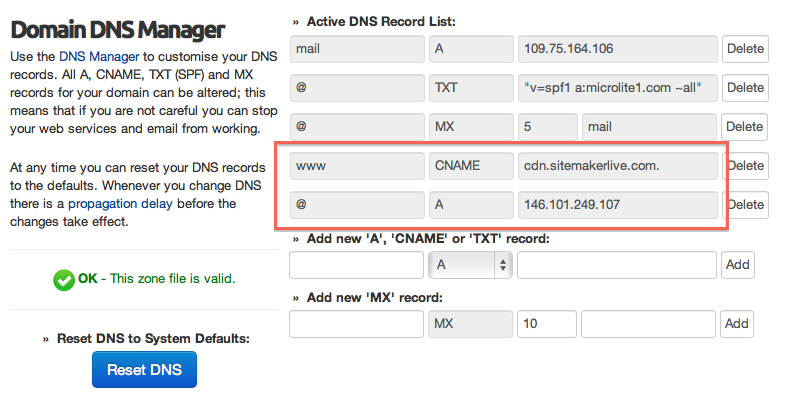
This article is retained because some customers still have an old Moonfruit or SiteMaker website, but its 2013 connection values are historical. Confirm the current destination with the website provider before changing DNS. If the old site is being replaced, choose a current builder and preserve its content first.

STATUSLegacy instructionsOld values may no longer be valid
SAFETYRecord DNS firstProtect website and email records
NEXTPlan a replacementDomain Builder, Sitejet or design

What should I do if an old Moonfruit website still works?

  1. 1
    Do not change working DNS casually

    Export or screenshot the current DNS zone and note which records serve the website, email and verification services.

  2. 2
    Confirm the current provider

    Sign in to the service account and obtain its current custom-domain instructions. Do not rely on values copied from an old article.

  3. 3
    Back up the content

    Save text, images, downloads, contact details and important page addresses before access to the old editor changes.

  4. 4
    Test before switching

    Build the replacement separately, test forms and mobile pages, then change only the records required by the new service.

How can I move without losing email?

Separate website from email

Website records commonly use A, AAAA or CNAME entries. Email usually depends on MX and supporting TXT records. Do not replace the entire zone just to move a website.

Keep the domain registered

Changing a website platform does not normally require transferring the domain. It can stay at UKC while DNS points to another service.

Preserve useful addresses

List the old page URLs that customers or search engines use. Add appropriate redirects when the new platform allows them.

Allow for DNS caching

Changes are not instant everywhere. Keep both old and new services available during the planned transition where possible.

What current UKC option can replace an old builder?

OptionUse it when
Domain Website BuilderYou need an AI-assisted single-page site. It is included with every UKC domain and supports unlimited edits.
Sitejet BuilderYou need a multi-page website with shared hosting, mail and the wider Plesk toolset. It is included with every hosting plan.
Managed web designYou want UKC to plan and build the site for you.
External platformYou have chosen another provider and only need to point the UKC domain using verified current DNS values.

Legacy connection questions

Can UKC tell me the current Moonfruit DNS values?

The destination values must come from the platform currently hosting the site. UKC can help you enter confirmed records into DNS Manager.

Will changing nameservers affect email?

It can. Nameserver changes replace the authoritative DNS provider, so every required website, email and verification record must exist at the new destination.

Should I delete the old website immediately?

No. Keep a recoverable copy until the replacement has been checked, DNS has settled and important old addresses have been tested.

Replace an old website safely

Choose the new platform before changing the domain

Then use only the current connection values supplied for that platform.

Was this helpful?
How to Use a UKC Domain With an Old Moonfruit Website written by UKC average rating 3.5/5 - 2 user ratings